If you want a fast-loading website, you’ve probably heard about CDN. But what exactly is it, and do you really need one?
The truth is — a CDN can make a huge difference in your website speed, performance, and security, especially if you have visitors from different locations.
In this guide, we’ll explain what a CDN is, how it works, and why you should use it — in simple terms.
🌐 What is a CDN?
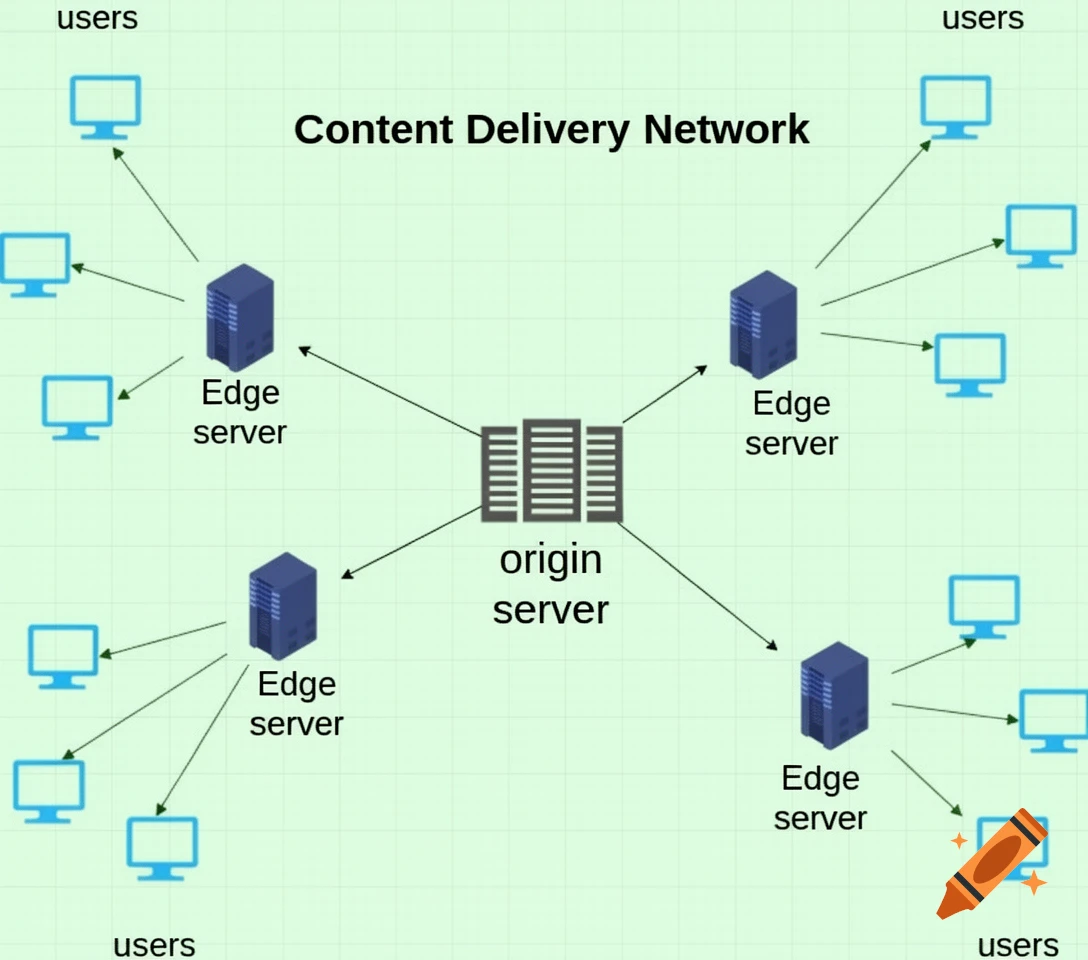
A CDN (Content Delivery Network) is a network of servers located around the world that store copies of your website content.
Instead of loading your website from a single server, a CDN delivers your content from the nearest server to your visitor.
👉 In simple words:
A CDN helps your website load faster by serving content from the closest location.
🧠 How Does a CDN Work?
Let’s say your website is hosted in the USA, but someone visits it from Bangladesh.
Without CDN:
- The request travels all the way to the USA
- Slower loading time
With CDN:
- Content is delivered from a nearby server (Asia)
- Faster loading time
👉 Result: Better speed and user experience
⚡ Why You Need a CDN
Here are the main benefits of using a CDN:
🚀 1. Faster Website Speed
CDNs reduce the distance between the server and users.
👉 This means:
- Faster page loading
- Better user experience
- Lower bounce rate
🌍 2. Global Performance
If your visitors come from different countries, a CDN ensures your site loads fast everywhere.
👉 Perfect for:
- Blogs
- Business websites
- E-commerce sites
🔒 3. Improved Security
CDNs provide extra security features like:
- DDoS protection
- Firewall
- Traffic filtering
👉 Helps protect your website from attacks.
📈 4. Better SEO Rankings
Google considers speed as a ranking factor.
👉 Faster website = better SEO performance
📉 5. Reduced Server Load
CDNs handle part of the traffic, reducing the load on your main server.
👉 This improves overall performance and stability.
📦 Types of Content CDN Delivers
CDNs usually cache:
- Images
- CSS files
- JavaScript
- Videos
- Static content
👉 Some advanced CDNs also handle dynamic content.
🏆 Popular CDN Providers
Here are some widely used CDN services:
⭐ Cloudflare
- Free plan available
- Easy setup
- Strong security
⭐ BunnyCDN
- Affordable
- Fast performance
- Pay-as-you-go pricing
⭐ StackPath
- Developer-friendly
- High performance
⚙️ How to Set Up a CDN (Simple Steps)
- Choose a CDN provider
- Sign up and add your website
- Update DNS settings
- Enable CDN in your hosting or WordPress
👉 Most CDNs are beginner-friendly and easy to set up.
🔗 Hosting + CDN (Perfect Combination)
Using a CDN with good hosting gives the best results.
📖 Read:
- 👉 How to Improve Website Speed (Hosting Tips)
- 👉 Best Web Hosting for Beginners in 2026
⚠️ Common CDN Mistakes
Avoid these:
- Not enabling caching properly
- Using CDN without good hosting
- Ignoring CDN settings
- Choosing the wrong server location
🎯 Final Thoughts
A CDN is one of the easiest ways to boost your website speed, security, and performance.
👉 If you want a faster website and better user experience, using a CDN is highly recommended.
Even beginners can set it up in minutes — and the results are worth it.
❓ FAQs
Is CDN free?
Some CDNs like Cloudflare offer free plans.
Do I need CDN for a small website?
Yes, it can still improve speed and performance.
Does CDN replace hosting?
No, CDN works together with hosting — not instead of it.